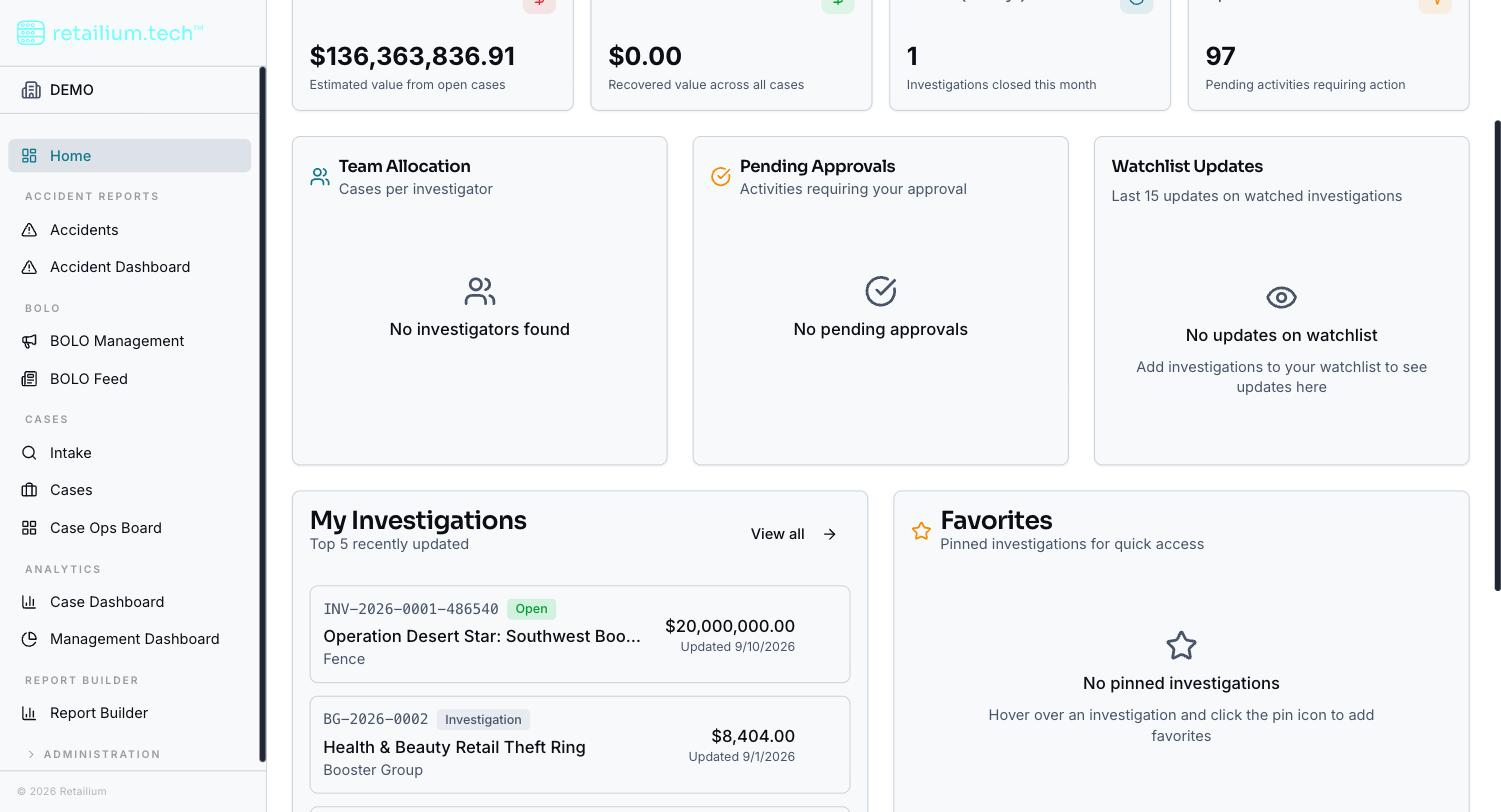
Home dashboard
Summary: You will learn what the Home Dashboard shows: the KPI tiles, quick actions, role-specific tiles, and your recent and pinned cases.
The Home Dashboard is where every role except Store Associate lands after signing in. It gives a personalized overview of your portfolio. How much of it you see varies widely by role: down to KPI tiles and nothing else for the field asset-protection roles.
KPI tiles
Every role that reaches the Home Dashboard sees the same four tiles, all scoped to what you are allowed to see:
| Tile | What it counts |
|---|---|
| Total Portfolio Loss | Estimated total value of open cases |
| Total Recovered | Recovered value recorded against recovered case items |
| Closed (30 days) | Cases closed in the last 30 days, with a trend against the prior 30 days |
| Open Activities | Activities in Requested, Approved, or In Progress status |
A walled Investigator's totals cover only their own accessible cases, not the whole organization.
Quick actions
An Add New menu in the page header holds up to three entries, shown only to the roles that can create incidents or cases:
- New Incident: the incident entry form.
- New Case: the new case form (external, or an internal case via guided intake).
Regional and District Asset Protection Managers get a single-entry menu (New Incident only): they create incidents, not cases. Roles that create nothing see no header action at all.
Role-specific tiles
Beyond the KPIs, the dashboard shows tiles matched to your role:
- Managers (Administrator, Supervisor, Managers) see Team Allocation (investigators and their open case counts), Pending Approvals (activities awaiting approval, with an inline approve action), and Watchlist Updates.
- Investigators see My Activities (grouped by priority) and Watchlist Updates.
- ORC Analysts see Incidents (30 days) (the busiest stores) and Event Linking (30 days), plus Watchlist Updates.
- Other roles that get none of the tile sets still get Watchlist Updates on its own: except the field asset-protection roles, which get no tile of any kind.
Recent cases and favorites
The five most recently updated cases you can reach are listed with their key details, plus a "View all" link. Hovering a row reveals a pin control that adds the case to your favorites.
Pins are personal: one user's pins are never visible to another, and pinning does not grant access to anything. The watchlist is a separate personal list from favorites: watchlisting feeds the Watchlist Updates tile, while pinning feeds the favorites list.
The recent list and favorites are hidden from the field asset-protection roles, whose work is incidents rather than cases.