
Use the Case Ops Board
Summary: You will use the Case Ops Board (an operations board with a triage action queue, per-case tiles, and card or Kanban views), to spot cases that need action.
The Case Ops Board shows what needs attention right now across the cases you can see. It refreshes itself every 60 seconds, so it stays current while you watch it.
Who sees what
| Role | Cases shown | Scope toggle |
|---|---|---|
| Investigator, ORC Analyst | External cases only | My Activity / Team Activity |
| Store Coordinator | Their assigned cases only (the same walled limit as Investigator) | Team Activity only |
| External Manager | The external lane: every case in the categories they hold | Team Activity only |
| Internal Manager | The internal lane: every case in the categories they hold | Team Activity only |
| Supervisor, Administrator | Both lanes, every case in the organization | Team Activity only |
| Platform Administrator | Only cases they own or are assigned to (in practice an empty board) | Team Activity only |
| Auditor, Viewer, External Partner, Store Associate, RAPM, DAPL | No access: the page is refused outright | - |
Worth calling out: Auditors and Viewers can read any case they are entitled to, but are still refused this board. Regional and District Asset Protection Managers reach no case at all and have no board. Store Coordinators, by contrast, now do have board access (limited to their assigned cases).
The KPI bar
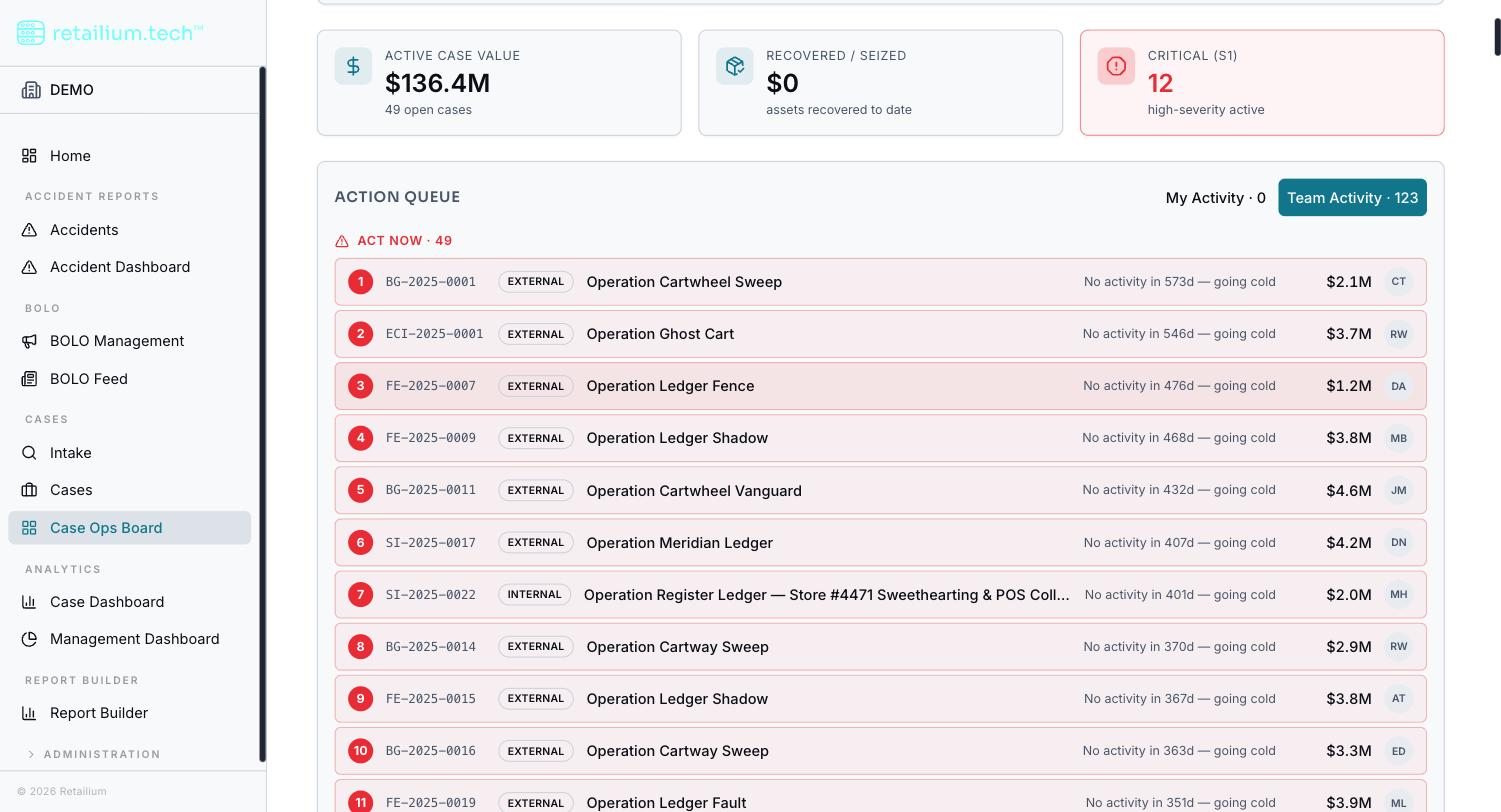
Three tiles sit at the top, computed over the cases you can see that are not closed:
- Active Case Value: the total estimated value of those cases.
- Recovered / Seized: the total recovered value of their case items.
- Critical (S1): how many are severity 1. This tile turns red whenever it is above zero.
The action queue
The action queue is the heart of the board: it tells you which cases need action, in priority order, across three bands.
Act Now (red):
- No lead assigned.
- No activity for 21 days or more.
Keep an Eye On (amber): anything last touched 7 to 20 days ago, plus a case with an activity awaiting review or in progress.
Ongoing Activity (blue): one row for every activity currently in progress on an open case, so a case with three activities under way appears three times, once per activity, each row naming the activity type that is running. This band keeps a case visible when nothing about it is overdue, and it always sorts after the two triage bands.
Within each band, cases are ordered by how long they have been quiet, longest first. When nothing qualifies for the first two bands, the queue says "You're all caught up: nothing needs action right now."
Staleness bands
Every case carries a staleness color based on time since its last activity:
| Band | Time since last activity | Color |
|---|---|---|
| Fresh | Under 7 days | Green |
| Watch | 7-20 days | Amber |
| Stale | 21 days or more | Red |
Views: Pulse and Kanban
The board shows your cases in either of two views:
- Pulse (card view): full cards showing the readable case ID, severity, name, status, case type, in-progress activity count, last activity, a KPI row (value, recovered, owner, investigators), a staleness bar, and the 30-day activity count with a trend arrow.
- Kanban (a staged view with two columns: Open and Closed, using dense cards (status, severity, name, value). (There is no longer a "Pending Review" column), that status no longer exists.)
The Kanban stages are a way of viewing the cases by status: not a place to drag them between. Change a case's status from the case itself, using Close or Reopen.
Internal case cards additionally carry the journal cadence indicator and a quick journal-entry control.
Open a case from the board
Select a card to open a right-side slide-in pane with a detail grid (status, value, recovered, severity, owner, investigators), a freshness or closed banner, the last three activities, and a link to the full case. The board stays behind the pane, so you can triage several cases in a row without losing your place.