
Configure readable ID settings
Summary: You will configure the templates that produce readable record numbers (like EVT-000042), then switch them on.
Every incident, accident report, and case carries a human-readable number in addition to its internal identity, for example EVT-000042 for an incident and SI-2026-0003 for a case. An administrator can configure how those numbers are formed, per organization, without a software release.
Who can configure this
Administrators only. Platform Administrators cannot: this is the organization's own numbering, not platform configuration.
How a number is formed
You write a template per record type, mixing fixed text with tokens that are filled in when a record is created.
| Token | Incidents & accident reports | Cases |
|---|---|---|
| A fixed prefix | Yes | Yes |
| The sequence number, with a chosen number of digits | Yes | Yes |
| The case type's short code | - | Yes |
| Division, region, district, state, store number | Yes | - |
| Two-digit year, four-digit year, month | Yes | Yes |
Scope decides which context gets its own counter. Scoping by division, for example, gives each division its own sequence starting at 1, rather than one organization-wide run of numbers. Where a scope value is missing when a record is created, a configured fallback stands in for it (for example, "XX" for a missing division).
Each case type maps to its own short code (for example, Special Investigations to SI) in a table on the same screen.
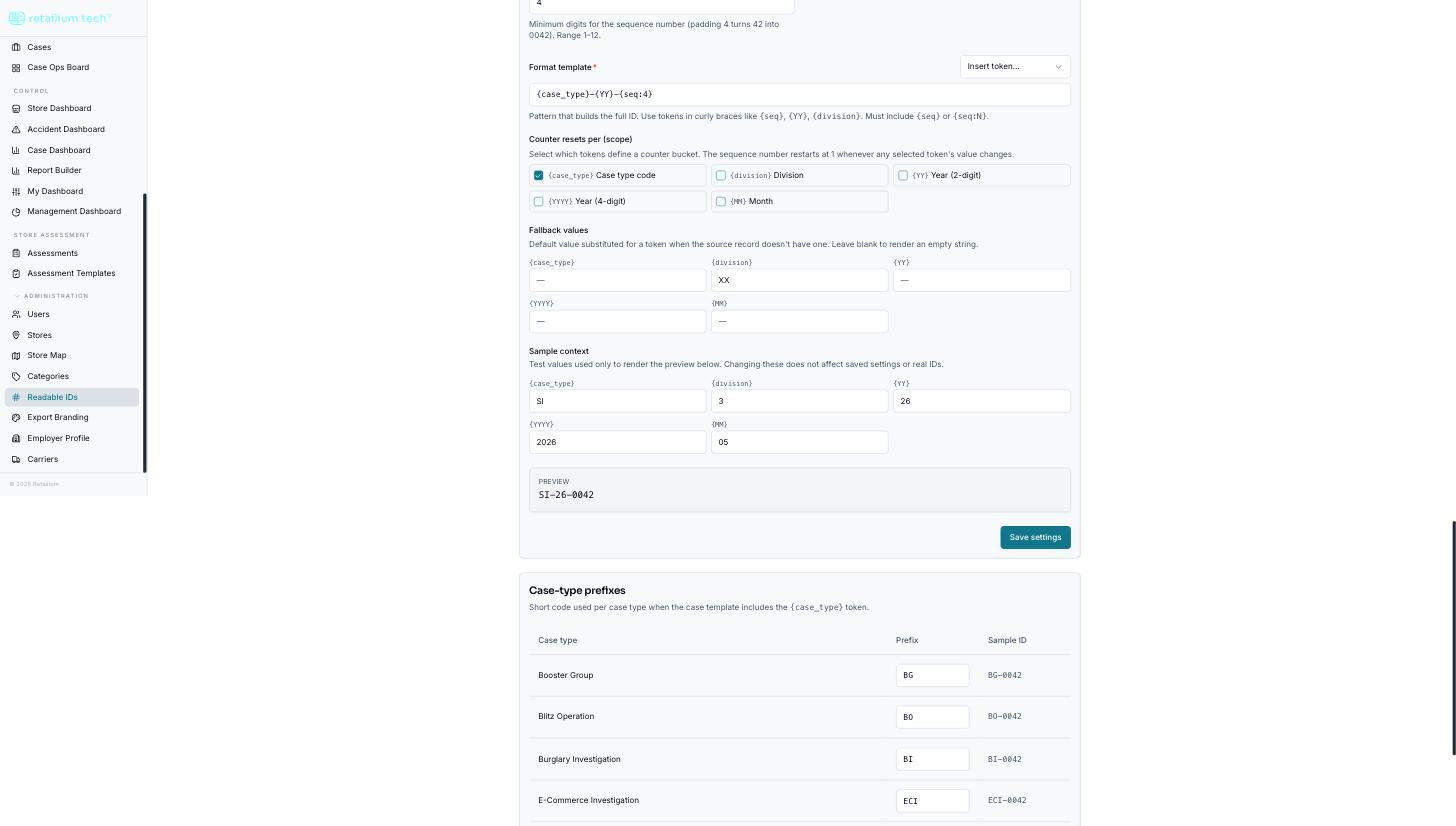
What is live today, and what is not
This is the one thing not to get wrong:
- Incidents and accident reports genuinely use the configured template, digit count, scope, and fallbacks, but only once the settings are switched on. Until then they use the built-in formats:
EVT-plus six digits, andACC-plus six digits. - Cases do not use the configured template. A case's number is always the case type's short code, then the four-digit year, then a four-digit sequence:
SI-2026-0003. The case-type short codes are honored and take effect as soon as you save them, regardless of the switch. Everything else configured for cases is stored but not applied. A case type with no short code falls back toINV.
Switch it on
Activation is one switch for the whole organization, not one per record type.
- Configure a valid template and digit count for all three record types. When the case template uses the case-type token, every case type must also have a non-empty, unique short code. The switch tells you which condition is unmet.
- Turn the switch on. You are asked to confirm, and the confirmation states that only records created afterward are affected.
To reverse it, turn the switch off: this reverts new incidents and accident reports to the built-in formats. It renumbers nothing.
Existing numbers are never changed, in either direction. There is no renumbering tool and no way to reissue a number.
Validation
- A template must contain a sequence token, or it is refused.
- The digit count must be between 1 and 12.
- Case-type short codes must be unique within the organization.
- An unrecognized token is refused rather than printed literally.
- A live preview shows the effect against sample values as you type.
What this does not do
There is no per-store, per-user, or per-case-owner numbering; numbers are not reserved in advance; and there is no way to import an existing scheme or seed a counter to a chosen starting value.