
Labels and case visibility
Summary: You will learn what labels are, how they control case visibility, and how an administrator creates and manages them.
A label is an access boundary: the category a case sits in and a user is admitted to. Administrators assign labels to both cases and users; the name and color a label carries are only how it is presented on screen. Labels are the dimension the compartment system (the Chinese Wall) turns on: you can see a case if you share at least one label with it, on top of the case-relationship check your role requires.
A label is called a category when assigned to a person: it is one shared set of names. Because a label controls access, deleting a label withdraws access to its cases from every user who held it.
How labels control visibility
- On a case: at least one label is required at creation. Removing the last label from an active case is blocked. Labels show as colored pills on the case list, the case header, and the Overview tab.
- On a user: zero or more categories.
Holding no category means seeing no cases at all: the system fails closed. A user with no categories has an empty case list, including cases they personally own or are assigned to. It is not narrowed access to their own work. Only the roles that bypass the wall entirely are unaffected.
- Administrators, Auditors, and Supervisors bypass the category check entirely and see every case in the organization. The manager roles do not: External and Internal Managers see every case in the categories they hold, and nothing outside them.
- External Partners bypass the category check but still need the case relationship: being an external partner is not by itself access to a case.
A change to someone's categories takes effect at their next sign-in refresh.
Labels and case shape
A label can be bound to a case template, which is what makes a case external or internal. The seeded External and Internal labels carry those bindings.
- All template-bearing labels on one case must agree.
- A case with no template-bound label defaults to the external shape.
- A label's binding cannot be changed once cases are using it, and converting a case from one shape to the other is not available today.
- Most labels are pure classification and carry no shape at all.
Manage labels (administrators)
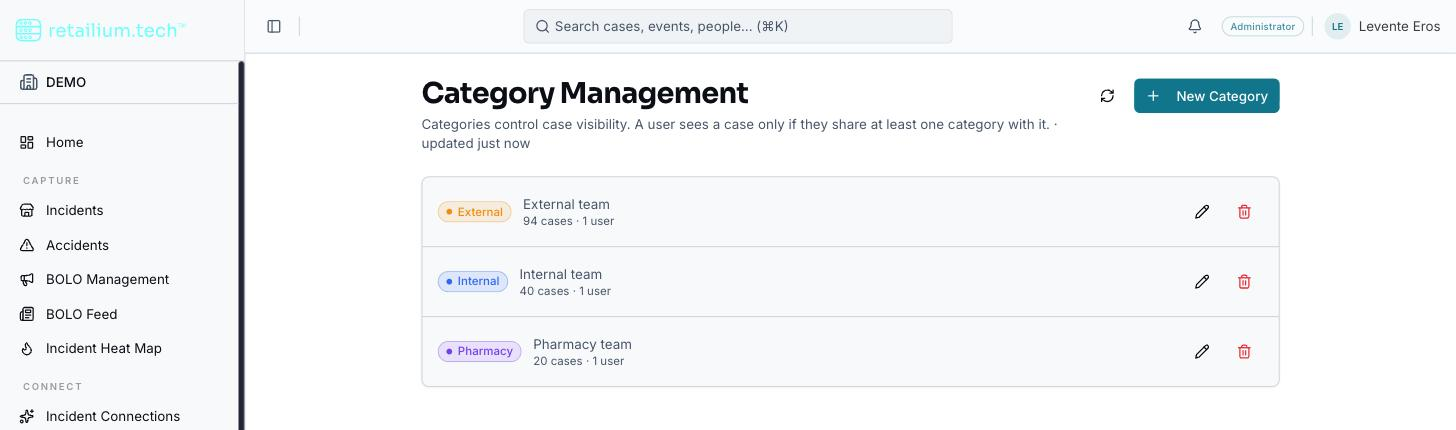
Label administration is an Administrator-only settings surface listing every label with its name, color, description, and how many cases and users hold it.
- Create a label: name required and unique within the organization; color and description optional.
- Edit a label: renaming or recoloring takes effect everywhere immediately, because cases and users reference the label itself, not a copy of its name.
- Delete a label: this warns first if any case would be left with zero labels, and requires explicit confirmation. Remember that deleting a label also withdraws case access from everyone who held it.
- Bind a template: only at creation, or on a label nothing uses yet.
Conflict detection across teams
A conflict is two cases that share a member or entity but have no overlapping categories: two sets of investigators, in categories that do not meet, working the same person without knowing it. When one is detected, an alert goes silently to the owner and the assigned investigator of the conflicting case (the people who can act on it), whether or not the person whose save triggered the match can see that case.
Each side of the alert is partitioned: a reader sees only the side they could already open, so neither party learns who the other is working or on which case. No alert crosses a category boundary to anyone else.